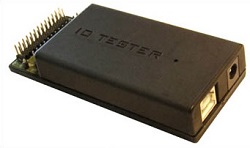
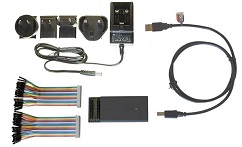
IOTester development tool
Price: DKK 1700
ORDER PRODUCT
To order product: Enter number of items, add to Shopping List, and go to Order Form.
Product description:
- IOTester tool:
- IOTester® box with the following features:
- USB-2 connection to PC
- 45 I/O pins. Parallel bus interface, 8/16-bit data bus, 1 - 24-bit address bus, 8080 / 6800 clock mode
- Build-in serial devices for SPI bus and I2C bus communication.
- Build-in devices for application control: timer, interrupt controller interrupt inputs, etc.
- Support for 3.3V target systems. 5V tolerant inputs.
- Regulated 3V3 supply. Powered from PC via USB cable.
- USB cable to PC.
- Win32, Win64 driver software for XP, Vista, Win7, Win8, Win10
- IOTester® box with the following features:
- Can be used directly with all RAMTEX RGB / Grey-level display driver libraries and B&W display driver libraries.
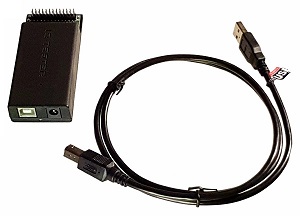
IOTester-DISP development tool
Price: DKK 1950
ORDER PRODUCT
To order product: Enter number of items, add to Shopping List, and go to Order Form.
Product description:
- IOTester - DISP tool:
- USB-2 connection to PC
- 45 I/O pins. Parallel bus interface, 8/16-bit data bus, 1 - 24-bit address bus, 8080 / 6800 clock mode
- Build-in serial devices for SPI bus and I2C bus communication.
- Build-in devices for application control: timer, interrupt controller interrupt inputs, etc.
- Support for 3.3V target systems. 5V tolerant inputs.
- Regulated 3V3 supply. Powered from PC via USB cable.
- Built-in RGB display controller for graphic display modules, RGB-18 and RGB-24 bus support.
- Built-in 16Mb RAM for use as video buffer or general image storage buffer.
- Built-in Copy-and-fill accelerator. Fast fill operations on internal memory or external buses. Fast copy operation between internal buffers or between internal buffers and devices on the external buses.
- Built-in PWM backlight control.
- Built-in touch screen controller. For 4-way resistive touch screens.
- USB cable to PC.
- Win32, Win64 driver software for XP, Vista, Win7, Win8, Win10
- Can be used directly with all RAMTEX RGB / Grey-level display driver libraries and B&W display driver libraries.
- The built-in TFT display controller can be used in combination with Generic display driver library for PC mode development and test of GUI applications using display driver modules with an RGB bus interface.
IOTester-DISP development kit
Price: DKK 2550
ORDER PRODUCT
To order product: Enter number of items, add to Shopping List, and go to Order Form.
Product description:
- Complete development kit:
- IOTester® DISP box with the following features:
- USB-2 connection to PC
- 45 I/O pins. Parallel bus interface, 8/16-bit data bus, 1 - 24-bit address bus, 8080 / 6800 clock mode
- Build-in serial devices for SPI bus and I2C bus communication.
- Build-in devices for application control: timer, interrupt controller interrupt inputs, etc.
- Support for 3.3V target systems. 5V tolerant inputs.
- Regulated 3V3 supply. Powered from PC via USB cable. Target connector can supply small target system such as display modules.
- Built-in RGB display controller for graphic display modules, RGB-18 and RGB-24 bus support.
- Built-in 16Mb RAM for use as video buffer or general image storage buffer.
- Built-in Copy-and-fill accelerator. Fast fill operations on internal memory or external buses. Fast copy operation between internal buffers or between internal buffers and devices on the external buses.
- Built-in PWM backlight control.
- Built-in touch screen controller. For 4-way resistive touch screens.
- USB cable to PC, Target test cables.
- Power adaptor 100V-240V AC to 5V DC 1A. Can supply target system with higher-current consumption such as large display modules with backlights. Enables IOTester to keep running while PC is disconnected. Direct connection to 5V-pin on target connector
- Win32, Win64 driver software for XP, Vista, Win7, Win8, Win10
- IOTester® DISP box with the following features:
- Can be used directly with all RAMTEX RGB / Grey-level display driver libraries and B&W display driver libraries.
- The built-in TFT display controller can be used in combination with Generic display driver library for PC mode development and test of GUI applications using display driver modules with an RGB bus interface.